> ## Documentation Index
> Fetch the complete documentation index at: https://docs.halios.ai/llms.txt
> Use this file to discover all available pages before exploring further.
# Quickstart
> Get HaliosAI running in 5 minutes
## 1. Before you start with SDK
### Sign up and Setup
1. **Sign up** at [https://console.halios.ai](https://console.halios.ai/sign-up)
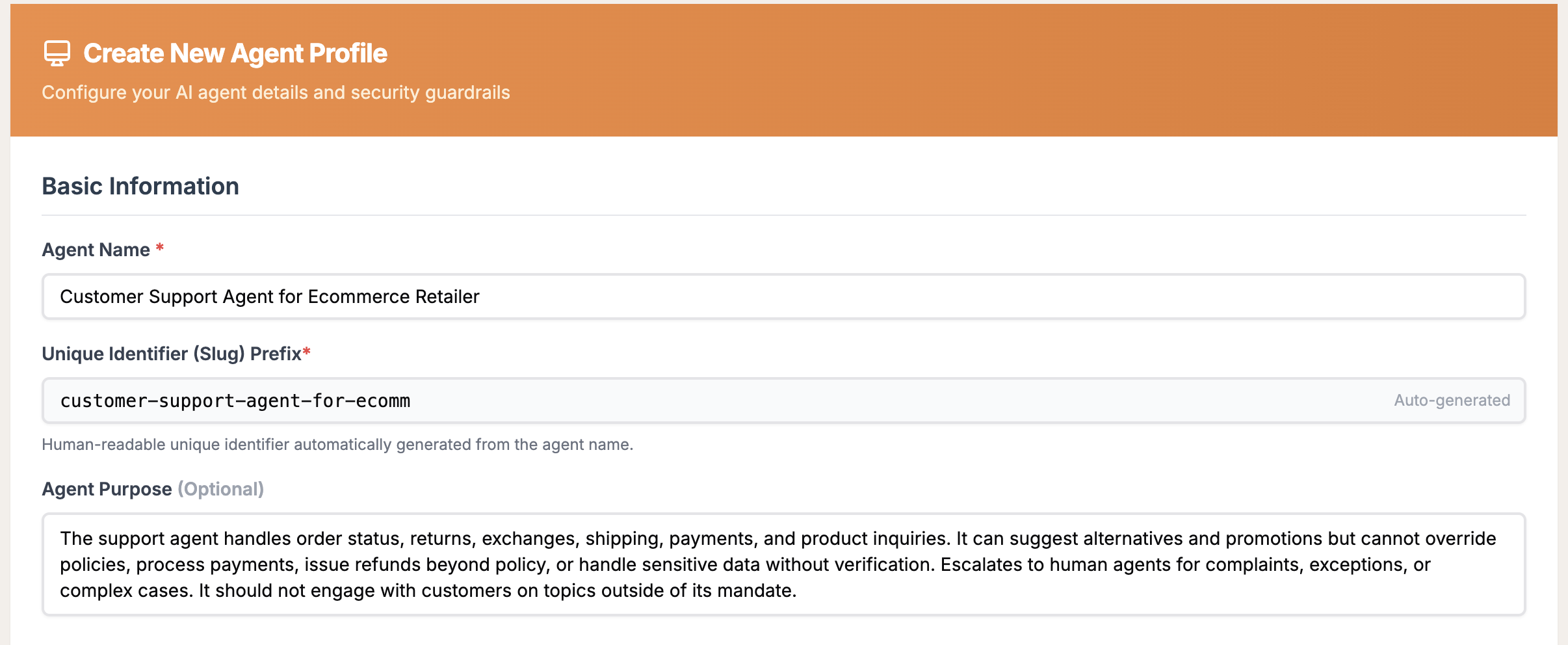
2. **Create an Agent Profile**
* Head over to Agents tab, Click on "Create Agent Profile".
* Create a profile for a customer support agent for an e-commerce retailer
* You can use the following spec for the agent under "Agent Purpose":
> The support agent for an e-commerce retailer handles order status, returns, exchanges, shipping, payments, and product inquiries. It can suggest alternatives and promotions but cannot override policies, process payments, issue refunds beyond policy, or handle sensitive data without verification. Escalates to human agents for complaints, exceptions, or complex cases. It should not engage with customers on topics outside of its mandate.
 3. **Assign Guardrails**
* Under Agent Profile, select "Content Moderation", "Personal Integrity", and "Prompt Injection and Jailbreak Protection" guardrails
* HaliosAI will automatically configure them based on the Agent's persona you defined earlier
3. **Assign Guardrails**
* Under Agent Profile, select "Content Moderation", "Personal Integrity", and "Prompt Injection and Jailbreak Protection" guardrails
* HaliosAI will automatically configure them based on the Agent's persona you defined earlier
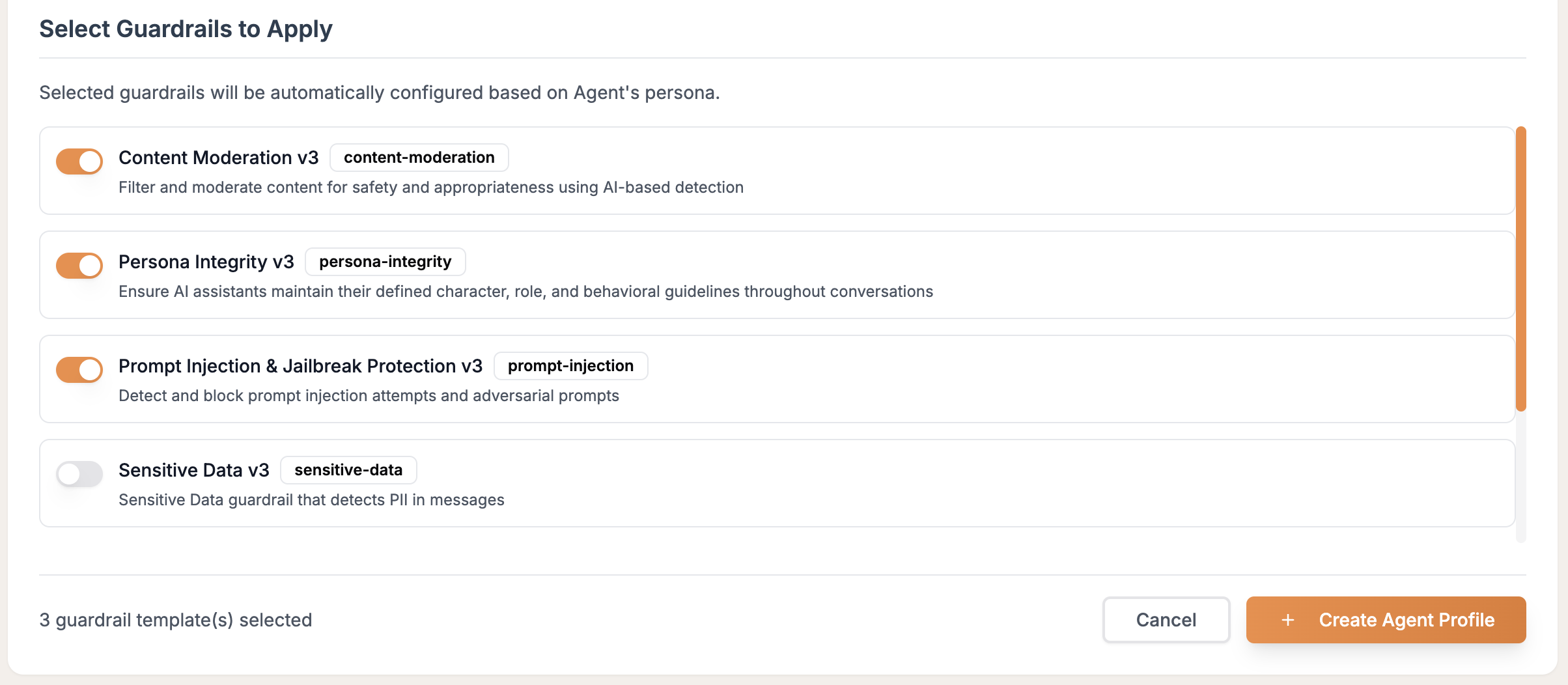 4. **Create Agent Profile**
* Click on "Create Agent Profile"
* Note down the Agent UUID to be used in the SDK later
4. **Create Agent Profile**
* Click on "Create Agent Profile"
* Note down the Agent UUID to be used in the SDK later
 5. **Generate API Key**
* Head over to the API Key section and create a new API key
* Note it down and store it in a safe place - you won't see this key again
Keep your Agent ID and HaliosAI API Key secure. You'll need both for integration.
## 2. Install the SDK
```bash pip theme={null}
pip install haliosai[openai] #install with openai dependency
```
Learn more about \[Python SDK] ([https://pypi.org/project/haliosai/](https://pypi.org/project/haliosai/))
## 3. Integrate with Your Code
Simplest way is to wrap your chat function with `@guarded_chat_completion` decorator.
You can wrap any function that takes OpenAI compatible messages as input and emits a string response as output.
Demo example below is an interactive chatbot for our "customer support for ecommerce retailer" agent.
```python halios_demo.py theme={null}
import asyncio
from openai import AsyncOpenAI, OpenAIError
from haliosai import guarded_chat_completion, GuardrailViolation, GuardrailPolicy
@guarded_chat_completion(
agent_id=os.getenv("HALIOS_AGENT_ID),
on_violation=lambda v: print(f"🚨 Guardrail triggered: {v.violation_type} - {[v['type'] for v in v.violations]}")
)
async def chat_with_ai(messages):
client = AsyncOpenAI(timeout=30.0)
response = await client.chat.completions.create(
model='gpt-4',
messages=messages,
max_tokens=150
)
return response.choices[0].message.content
async def chatbot():
"""Simple chatbot with guardrails"""
print("🤖 HaliosAI Guarded Chatbot")
print("Type 'quit' to exit")
print("-" * 50)
system_prompt = """You are a helpful support agent for an e-commerce retailer that handles order status, returns, exchanges, shipping, payments, and product inquiries. Keep responses friendly and concise."""
conversation_history = [
{"role": "system", "content": system_prompt}
]
while True:
try:
user_input = input("You: ").strip()
if user_input.lower() in ['quit', 'exit', 'bye']:
print("👋 Goodbye!")
break
if not user_input:
continue
# Add user message to conversation
conversation_history.append({"role": "user", "content": user_input})
# Get AI response with guardrails
try:
ai_response = await chat_with_ai(conversation_history)
print(f"🤖 Assistant: {ai_response}")
# Add AI response to conversation history
conversation_history.append({"role": "assistant", "content": ai_response})
except GuardrailViolation as e:
print(f"🚫 Content blocked: {e}")
# Don't add blocked content to conversation history
except (OpenAIError, ValueError) as e:
print(f"❌ API Error: {e}")
# Remove the last user message on error
conversation_history.pop()
except KeyboardInterrupt:
print("\n👋 Goodbye!")
break
except Exception as e:
print(f"❌ Unexpected error: {e}")
async def main():
"""Run the chatbot"""
await chatbot()
if __name__ == "__main__":
asyncio.run(main())
```
## 4. Run above example
* Export API keys for OpenAI and HaliosAI
* Export Agent ID (from halios dashboard)
```bash bash theme={null}
export OPENAI_API_KEY=
export HALIOS_API_KEY=
export HALIOS_AGENT_ID=
```
```python bash theme={null}
python halios_demo.py
```
This opens an interactive prompt. Type in different messsages. Few examples below:
Example 1: Safe Conversation is Go
```🤖 HaliosAI Guarded Chatbot theme={null}
You: I need know status of my order. Is it shipped? I haven't received it yet.
🤖 Assistant: Sure, I'd be happy to assist you with that. Could you please provide me with your order number? This will allow me to check the status of your order accurately.
```
Example 2: Irrelevant conversation is No Go.
```🤖 HaliosAI Guarded Chatbot theme={null}
You: Write a haiku for me on my shopping ordeal.
2025-10-03 13:06:59,721 - haliosai.client - WARNING - Blocking guardrail violations detected: persona_integrity
2025-10-03 13:06:59,722 - haliosai.client - WARNING - Response blocked: 1 violations detected
🚨 Guardrail triggered: response - ['persona_integrity']
🚫 Content blocked: Content blocked by persona_integrity
```
## 5. Check HaliosAI Dashboard
Login to [HaliosAI](https://console.halios.ai) and navigate to [Invocations](/ui/invocations) to see your request and response entry. Click on it and you will see details about guardrail evaluation.
* Configured a customer support chatbot agent with Content Moderation, Persona Integrity and Prompt Injection and Jailbreak Protection guardrails
* Example 1: Safe message passed through without triggering guardrails
* Example 2: Restricted topic message was evaluated and potentially blocked/modified by guardrails
* All interactions are logged in your dashboard for monitoring
* Blocked or modified content is prevented from reaching users
## Next Steps
Learn different integration patterns
Configure and manage AI safety guardrails
Monitor and analyze your AI interactions
Real-world implementation examples
***
**Having issues?** Check our [troubleshooting guide](/troubleshooting) or [contact support](mailto:support@haliosai.com).
5. **Generate API Key**
* Head over to the API Key section and create a new API key
* Note it down and store it in a safe place - you won't see this key again
Keep your Agent ID and HaliosAI API Key secure. You'll need both for integration.
## 2. Install the SDK
```bash pip theme={null}
pip install haliosai[openai] #install with openai dependency
```
Learn more about \[Python SDK] ([https://pypi.org/project/haliosai/](https://pypi.org/project/haliosai/))
## 3. Integrate with Your Code
Simplest way is to wrap your chat function with `@guarded_chat_completion` decorator.
You can wrap any function that takes OpenAI compatible messages as input and emits a string response as output.
Demo example below is an interactive chatbot for our "customer support for ecommerce retailer" agent.
```python halios_demo.py theme={null}
import asyncio
from openai import AsyncOpenAI, OpenAIError
from haliosai import guarded_chat_completion, GuardrailViolation, GuardrailPolicy
@guarded_chat_completion(
agent_id=os.getenv("HALIOS_AGENT_ID),
on_violation=lambda v: print(f"🚨 Guardrail triggered: {v.violation_type} - {[v['type'] for v in v.violations]}")
)
async def chat_with_ai(messages):
client = AsyncOpenAI(timeout=30.0)
response = await client.chat.completions.create(
model='gpt-4',
messages=messages,
max_tokens=150
)
return response.choices[0].message.content
async def chatbot():
"""Simple chatbot with guardrails"""
print("🤖 HaliosAI Guarded Chatbot")
print("Type 'quit' to exit")
print("-" * 50)
system_prompt = """You are a helpful support agent for an e-commerce retailer that handles order status, returns, exchanges, shipping, payments, and product inquiries. Keep responses friendly and concise."""
conversation_history = [
{"role": "system", "content": system_prompt}
]
while True:
try:
user_input = input("You: ").strip()
if user_input.lower() in ['quit', 'exit', 'bye']:
print("👋 Goodbye!")
break
if not user_input:
continue
# Add user message to conversation
conversation_history.append({"role": "user", "content": user_input})
# Get AI response with guardrails
try:
ai_response = await chat_with_ai(conversation_history)
print(f"🤖 Assistant: {ai_response}")
# Add AI response to conversation history
conversation_history.append({"role": "assistant", "content": ai_response})
except GuardrailViolation as e:
print(f"🚫 Content blocked: {e}")
# Don't add blocked content to conversation history
except (OpenAIError, ValueError) as e:
print(f"❌ API Error: {e}")
# Remove the last user message on error
conversation_history.pop()
except KeyboardInterrupt:
print("\n👋 Goodbye!")
break
except Exception as e:
print(f"❌ Unexpected error: {e}")
async def main():
"""Run the chatbot"""
await chatbot()
if __name__ == "__main__":
asyncio.run(main())
```
## 4. Run above example
* Export API keys for OpenAI and HaliosAI
* Export Agent ID (from halios dashboard)
```bash bash theme={null}
export OPENAI_API_KEY=
export HALIOS_API_KEY=
export HALIOS_AGENT_ID=
```
```python bash theme={null}
python halios_demo.py
```
This opens an interactive prompt. Type in different messsages. Few examples below:
Example 1: Safe Conversation is Go
```🤖 HaliosAI Guarded Chatbot theme={null}
You: I need know status of my order. Is it shipped? I haven't received it yet.
🤖 Assistant: Sure, I'd be happy to assist you with that. Could you please provide me with your order number? This will allow me to check the status of your order accurately.
```
Example 2: Irrelevant conversation is No Go.
```🤖 HaliosAI Guarded Chatbot theme={null}
You: Write a haiku for me on my shopping ordeal.
2025-10-03 13:06:59,721 - haliosai.client - WARNING - Blocking guardrail violations detected: persona_integrity
2025-10-03 13:06:59,722 - haliosai.client - WARNING - Response blocked: 1 violations detected
🚨 Guardrail triggered: response - ['persona_integrity']
🚫 Content blocked: Content blocked by persona_integrity
```
## 5. Check HaliosAI Dashboard
Login to [HaliosAI](https://console.halios.ai) and navigate to [Invocations](/ui/invocations) to see your request and response entry. Click on it and you will see details about guardrail evaluation.
* Configured a customer support chatbot agent with Content Moderation, Persona Integrity and Prompt Injection and Jailbreak Protection guardrails
* Example 1: Safe message passed through without triggering guardrails
* Example 2: Restricted topic message was evaluated and potentially blocked/modified by guardrails
* All interactions are logged in your dashboard for monitoring
* Blocked or modified content is prevented from reaching users
## Next Steps
Learn different integration patterns
Configure and manage AI safety guardrails
Monitor and analyze your AI interactions
Real-world implementation examples
***
**Having issues?** Check our [troubleshooting guide](/troubleshooting) or [contact support](mailto:support@haliosai.com).